How a booking gets made
Heron works inside your own appointment book. It has no diary of its own.
Heron reads the free slots
It asks Medtech for the gaps in a named provider’s book over a date range, filtered to free ones. Exactly what reception sees when they look at the day.
It can’t invent a slot, stretch one, or put someone on top of an existing booking. If the book is full, Heron has nothing to offer.
The caller picks a time
Heron offers real times. When the caller agrees to one, Heron holds that specific slot rather than a time of day, so two callers can’t land in the same gap.
The booking is written
Heron sends the patient, the provider, the site, the slot and the appointment type, and asks Medtech to mark it as booked.
Medtech works out the finish time from the slot length. Heron doesn’t set it, so a booking can never run longer than you intended.
What lands in the appointment book
An ordinary appointment. Nothing about it is locked or special: reception can open it, edit it, move it or cancel it by hand, the same as any other.
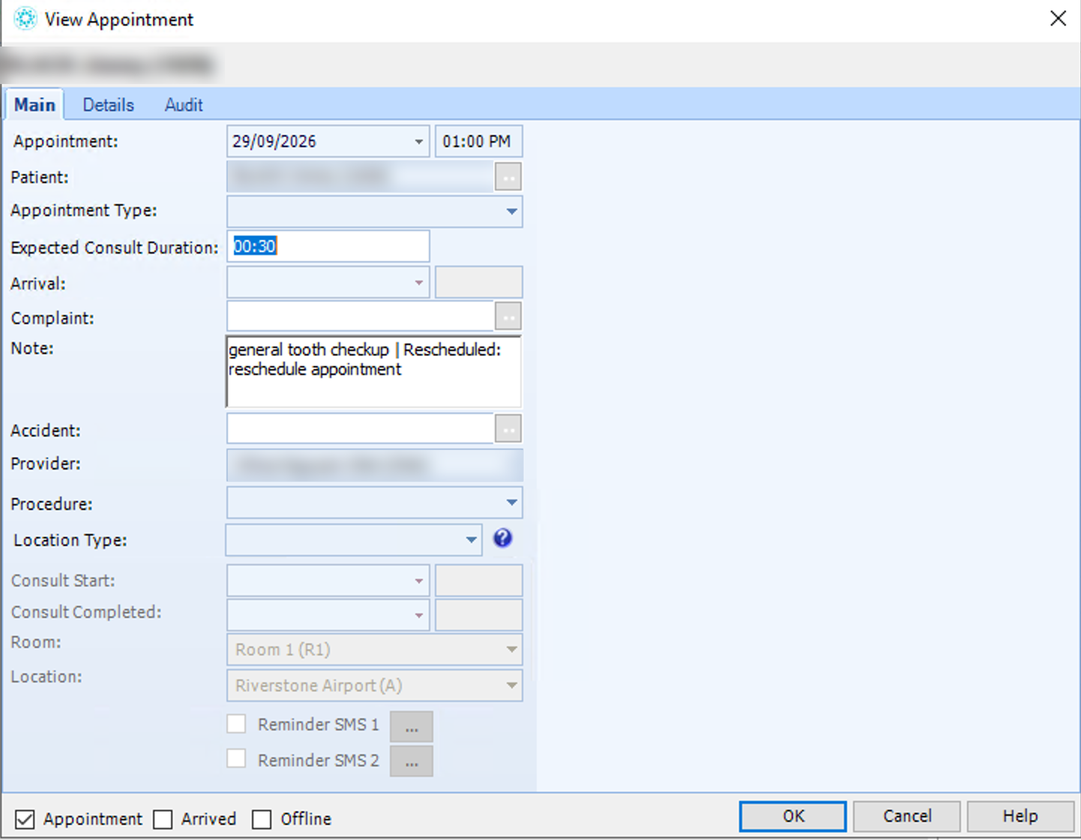
| Field | What Heron fills in, or leaves alone |
|---|---|
| Appointment date and time | The start of the slot the caller chose |
| Patient | The record Heron matched, or the one it just created |
| Appointment Type | Left blank unless you’ve asked us to map yours |
| Expected Consult Duration | Taken from the slot. Heron doesn’t set it |
| Arrival | Left alone. Check-in stays with reception |
| Complaint | Left alone. This is your own coded field |
| Note | What the call was about, in the caller’s words |
| Accident | Left alone |
| Provider | Whoever the caller asked for, or whoever was free |
| Procedure, Location Type | Left alone |
| Room, Location | Set by your own configuration for that slot |
Moving and cancelling
Both go through Medtech properly. Nothing is faked or shadowed.
Cancelling
The appointment is set to cancelled and the slot frees up straight away, ready for the next caller.
Moving
A move is a cancel plus a new booking. Heron secures the new slot before releasing the old one, so nobody loses their place while the caller is still deciding.
Arriving the patient
Heron doesn’t do this. The Arrival field and the Arrived tick stay with reception, and check-in happens at the desk as it always has.
What Heron can and can’t do in the book
| Heron | Reception | |
|---|---|---|
| Seeing the book | Free slots, any provider, any date range | Everything, including internal blocks |
| Booking | Into existing free slots only | Anywhere, including overbooking |
| Setting the length | No, it comes from the slot | Yes |
| Creating slots | No | Yes, through the roster |
| Moving and cancelling | Yes | Yes |
| Marking arrived | No | Yes, at the desk as usual |
| Double booking | Not possible | Possible, when you choose to |
Questions practices ask
- Can it double book us?
- No. It books into slots you’ve already opened, and it holds the specific slot while the caller decides.
- What if two people ring at once for the same time?
- First to confirm gets it. The second is offered the next available.
- Can we tell which bookings came from Heron?
- Yes, from the note on the appointment and the time it was made.
- Can we still move or cancel it ourselves?
- Yes. Nothing about a Heron booking is locked.
- Can it book with any of our doctors?
- Whoever you allow. That’s set per provider.
- Can patients only book with their own GP?
- Yes. You can lock bookings so a patient can only book with their registered clinician.
- Can it book a double appointment?
- Only if you have a longer slot type available. Heron uses the slot lengths that already exist.
- Does it check patients in when they turn up?
- No. Arriving a patient stays with reception.
- What about after hours?
- This is where most practices see the value. The call comes in at 9pm and the booking is in the book before anyone arrives in the morning.