Option one: a task for the clinician
Available now, on any version of Medtech.
The patient asks for a repeat
By phone, text or web form, out of hours or during the day. Heron checks the patient’s current medications in Medtech and confirms which item they mean.
Heron creates a task in Medtech
The request becomes a task assigned to the clinician, or to a named staff member, attached to the patient, with a due date and time and marked urgent or normal.
Nothing is prescribed yet.
The clinician actions it
They prescribe from Medtech the way they always do, with the usual interaction and allergy checking.
Medtech sends the confirmation
The patient’s confirmation comes from Medtech, the same way it does for any repeat. Heron doesn’t send it.
Tasks are also useful for follow-up that isn’t a prescription: ring this patient back, chase this result, check this form.
Option two · available nowOption two: a note in the daily record
Available now, on any version of Medtech.
Heron writes the request into the daily record
The request is added to the patient’s consultation notes in their daily record, dated to when the contact happened, and marked confidential if needed.
The clinician picks it up from the patient’s record
They review it alongside the rest of the patient’s notes and prescribe from Medtech in the normal way.
Medtech sends the confirmation
As with every route, the confirmation comes from Medtech, not from Heron.
Option three: the clinician’s inbox
A message in the clinician’s inbox, actioned the way they action everything else. We’re building this route too.
Heron writes the request into the inbox
It arrives as a prescription message addressed to a named provider, or to the default inbox if no one is named. A PDF of the request is attached.
The clinician works it in their inbox
It sits with their labs, referrals and general messages, in the folder they already use for repeat prescription messages. They prescribe from there in the normal way.
Medtech sends the confirmation
As with the other routes, the confirmation comes from Medtech, not from Heron.
Option four: the medication approval queue
We’re building a route where each request lands in Medtech’s approval queue, and the GP approves each item on screen so it becomes a real prescription. Here’s how it will work.
Heron sends the request for approval
The request goes into an approval queue attached to the patient’s record. Nothing is prescribed yet.
A pink banner appears on the patient’s medications screen saying items are waiting.
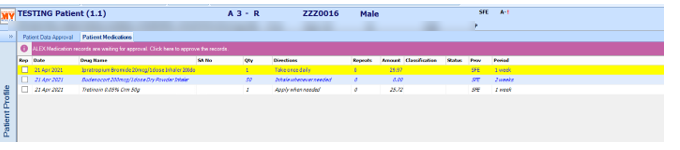
Patient Medications, with the approval banner The GP sees it in Patient Data Approval
Clicking the banner opens the Medications tab, showing each request with the drug, dose, directions, quantity and repeats, marked Awaiting Approval.
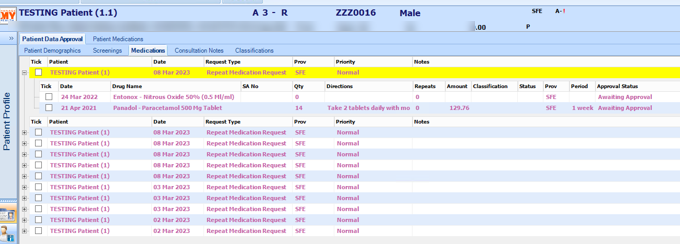
Patient Data Approval, Medications tab The GP accepts or declines
Tick and click: Accept or Decline, per item.
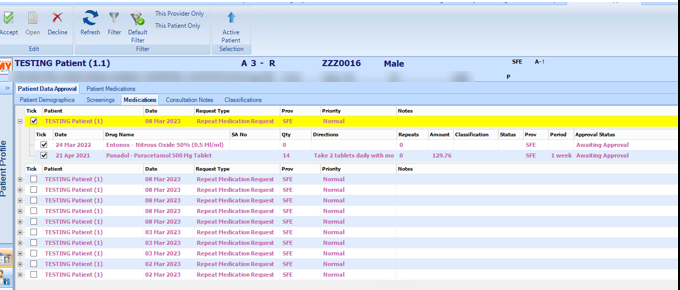
Accept and Decline Interaction and allergy checking runs exactly as it does for a normal prescription. The GP can suppress a warning or back out.
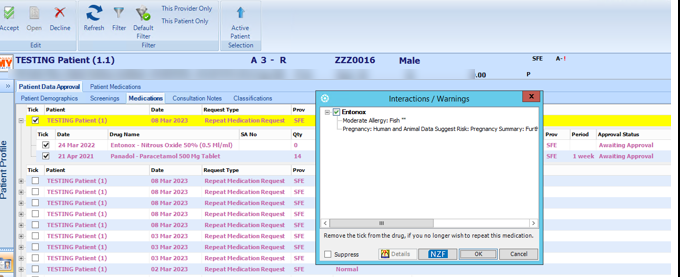
Interaction and allergy checking Approved items become real medications
Once approved, the item drops into the patient’s medication record like anything the GP prescribed themselves.

Patient Medications, after approval Medtech confirms with the patient
The confirmation comes from Medtech, not from Heron.
Which route suits your practice
| Task | Daily record | Clinician’s inbox | Approval queue | |
|---|---|---|---|---|
| Available | Now | Now | In development | In development (Evolution 6.2 and above) |
| Works on Medtech 32 | Yes | Yes | Yes | No |
| Where the clinician works it | Their task list | The patient’s notes | Their inbox | Patient Data Approval |
| How they approve | They prescribe as normal | They prescribe as normal | They prescribe as normal | One click per item |
| Interaction checking | As part of prescribing | As part of prescribing | As part of prescribing | Built into the approval screen |
| Patient confirmation | From Medtech | From Medtech | From Medtech | From Medtech |
Questions practices ask
- Is Heron prescribing?
- No. It takes the request and puts it in front of the clinician. The clinician prescribes.
- Does the interaction checking still run?
- Yes, on every route, the same as whenever the clinician prescribes.
- Can the clinician decline?
- Yes. They simply don’t prescribe, and your practice lets the patient know as usual. With the approval queue, they’ll decline per item, with a reason.
- Who tells the patient it’s done?
- Medtech sends the confirmation, not Heron.
- Can it request a medication the patient has never had?
- No. It works from what’s already on their record. New prescriptions are booked as an appointment.
- We’re on Medtech 32. Can we use this?
- Yes. Tasks and daily record notes work on every version of Medtech. The approval queue, when it’s ready, will need Evolution 6.2.
Screens from Medtech’s ALEX documentation, using Medtech’s test patient. Address and contact details blurred.